> ## Documentation Index
> Fetch the complete documentation index at: https://docs.cloud.coinbase.com/llms.txt
> Use this file to discover all available pages before exploring further.
# SQL API: Quickstart
export const SqlApiRestExample = () => {
return <>
The SQL API /run endpoint accepts your query as a string value. Before running, replace $CLIENT_TOKEN with your CDP Client API key.
{`curl -H "Authorization: Bearer $CLIENT_TOKEN" -H "Content-Type: application/json" -X POST "https://api.cdp.coinbase.com/platform/v2/data/query/run" -d '{"sql": "SELECT * FROM base.events LIMIT 1"}'`}
After running the above, you should see a similar response to the following:
{`{
"metadata": {
"cached": false,
"executionTimeMs": 17,
"rowCount": 1
},
"result": [
{
"action": "added",
"address": "0x09c7bad99688a55a2e83644bfaed09e62bdcccba",
"block_hash": "0xed367272b150a98953cb5a1fe725742373432f89c848852e6ebe8319c4bf901f",
"block_number": "6728",
"block_timestamp": "2023-06-15T04:20:03.000Z",
"event_name": "AdminChanged",
"event_signature": "AdminChanged(address,address)",
"log_id": "9f33b5afc2f2ade4bcdcefd3077945dc",
"log_index": 0,
"parameter_types": {
"newAdmin": "address",
"previousAdmin": "address"
},
"parameters": {
"newAdmin": "0x76a737dac0c4eb926bd7d2d68b958a1ae6ad6993",
"previousAdmin": "0x0000000000000000000000000000000000000000"
},
"topics": [
"0x7e644d79422f17c01e4894b5f4f588d331ebfa28653d42ae832dc59e38c9798f"
],
"transaction_from": "0x0cf966857325db9a9b4dada66e80ce581c18aca1",
"transaction_hash": "0x08ecc43f4394eb6a7c0c7bf89d4c95c2ba67a7d3ce9f08dc09c5f8c29b1e5de3",
"transaction_to": "0x4e59b44847b379578588920ca78fbf26c0b4956c"
}
]
}`}
;
};
export const SqlPlaygroundQuickstart = () => {
return <>
Use our SQL API to query onchain data in milliseconds. With SQL API, you can:
- Query transactions, events, blocks, and transfers across Base with < 500ms latency
- Join data across tables for complex analytics
- Track token flows, smart contract activity, and wallet behavior
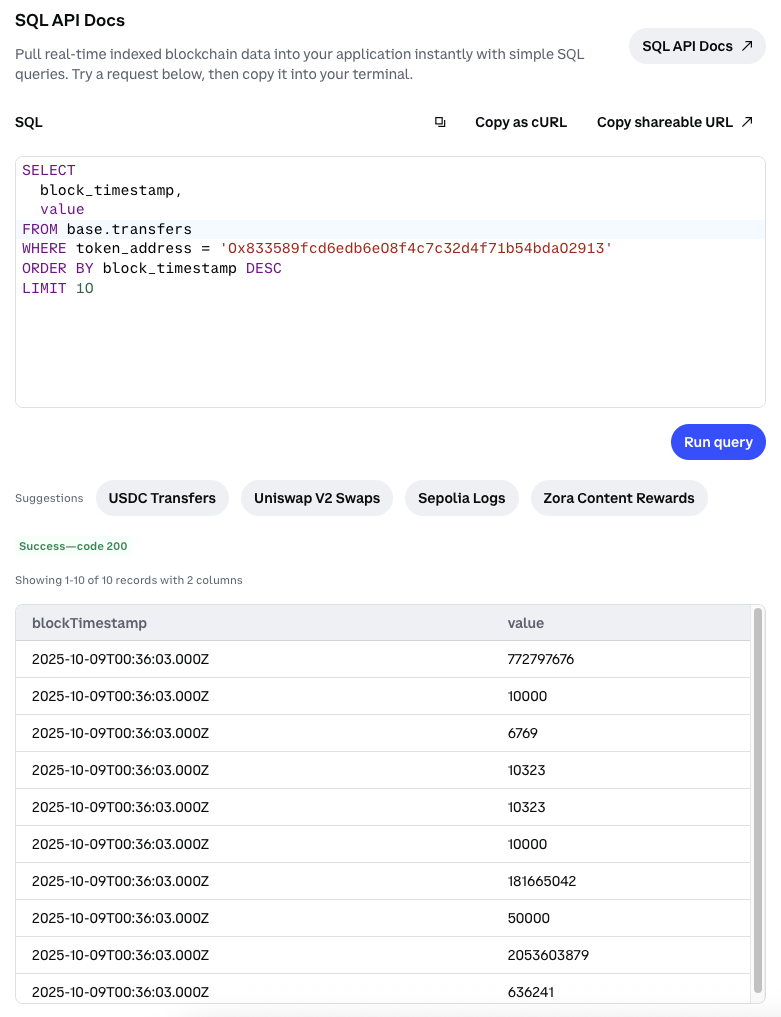
The fastest way to query onchain data is through the SQL Playground in CDP Portal.
Navigate to the SQL Playground in Portal.
Copy this query to see recent USDC transfers on Base:
{`SELECT
parameters['from'] AS sender,
parameters['to'] AS to,
parameters['value'] AS amount,
address AS token_address
FROM base.events
WHERE
event_signature = 'Transfer(address,address,uint256)'
AND address = '0x833589fcd6edb6e08f4c7c32d4f71b54bda02913'
LIMIT 10;`}
See results in milliseconds! ⚡
 ;
};
## Overview
The SQL API allows you to create custom queries to pull real-time and historical onchain data from Base.
In this quickstart, you will learn how to:
* Read and use the tables in CDP's curated schema.
* Pull data from the Base blockchain with a SQL query.
## Prerequisites
Sign in to the [CDP Portal](https://portal.cdp.coinbase.com/).
**Using the SQL Playground?** No API keys needed!
**Using the API programmatically?** Create a free [CDP Client API key](https://portal.cdp.coinbase.com/projects/api-keys/client-key) for the cURL example below.
## 1. Try it in the playground
## 2. Run a query programmatically
## What to read next
* [Schema reference](/data/sql-api/schema): Familiarize yourself with our supported tables for SQL queries
* [REST API Reference](/data/sql-api/rest-apis): Use the SQL API programmatically
;
};
## Overview
The SQL API allows you to create custom queries to pull real-time and historical onchain data from Base.
In this quickstart, you will learn how to:
* Read and use the tables in CDP's curated schema.
* Pull data from the Base blockchain with a SQL query.
## Prerequisites
Sign in to the [CDP Portal](https://portal.cdp.coinbase.com/).
**Using the SQL Playground?** No API keys needed!
**Using the API programmatically?** Create a free [CDP Client API key](https://portal.cdp.coinbase.com/projects/api-keys/client-key) for the cURL example below.
## 1. Try it in the playground
## 2. Run a query programmatically
## What to read next
* [Schema reference](/data/sql-api/schema): Familiarize yourself with our supported tables for SQL queries
* [REST API Reference](/data/sql-api/rest-apis): Use the SQL API programmatically