> ## Documentation Index
> Fetch the complete documentation index at: https://docs.cloud.coinbase.com/llms.txt
> Use this file to discover all available pages before exploring further.
# Quickstart
Get started with **Coinbase-hosted Onramp and Offramp** by setting up your CDP account, creating a Secret API Key, and making your first API calls. Users will complete transactions on Coinbase-hosted pages.
Looking for a native in-app experience? See [Headless Onramp](/onramp/headless-onramp/overview) for Apple Pay and Google Pay integration.
## Prerequisites
Before you begin, you'll need:
Create your free [Coinbase Developer Platform account](https://portal.cdp.coinbase.com). Verify your email and set up 2-factor authentication (2FA).
Navigate to the **API Keys** tab in [CDP Portal](https://portal.cdp.coinbase.com/projects/api-keys). Under the **Secret API Key** tab, create your API key by entering a nickname (restrictions are optional).
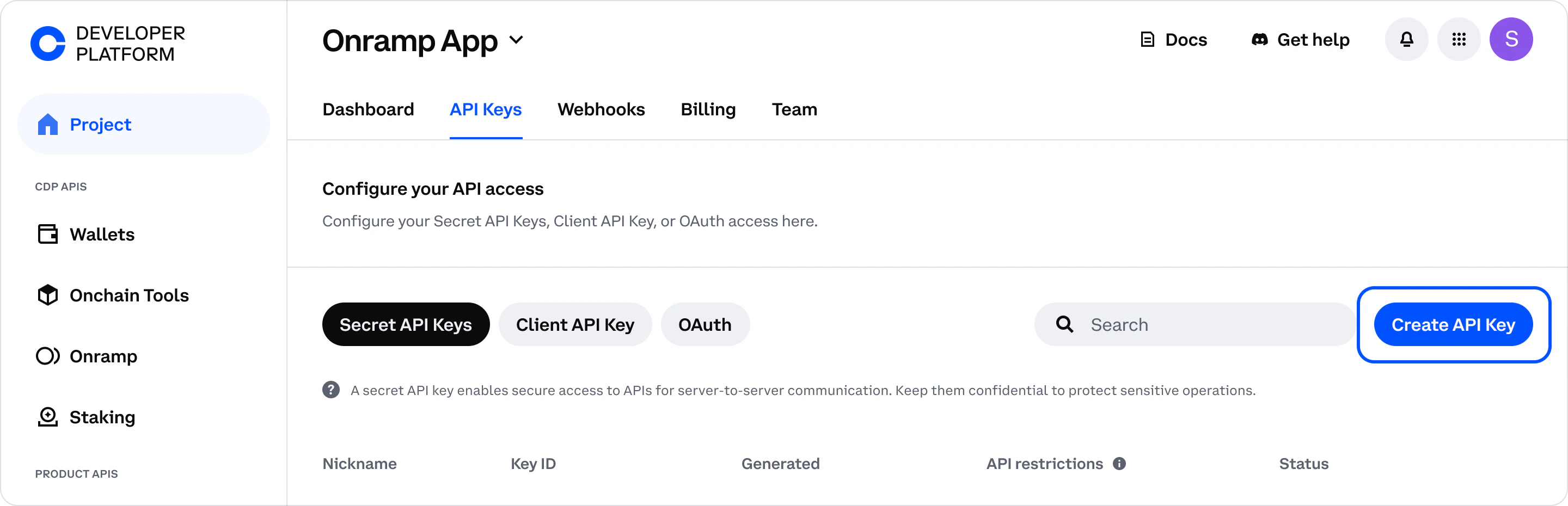 API key files are no longer automatically downloaded. Click **Download API key** to save the key file to your Downloads folder, or copy the details directly from the modal to use as environment variables.
Make sure you create a **Secret API Key** (not a Client API Key). Client API Keys are for client-side JSON-RPC requests and will not work with Onramp/Offramp REST APIs.
Install [`cdpcurl`](https://github.com/coinbase/cdpcurl) to make authenticated HTTP requests:
```bash theme={null}
npm install -g @coinbase/cdpcurl
```
Verify installation:
```bash theme={null}
cdpcurl --version
```
## Try Onramp
Generate a session token and create an onramp URL to enable users to purchase crypto.
### 1. Create a session token
Generate a session token with a destination wallet address.
For example:
```bash theme={null}
cdpcurl -X POST 'https://api.developer.coinbase.com/onramp/v1/token' \
-k ~/Downloads/cdp_api_key.json \
-d '{
"addresses": [{
"address": "0x1234567890abcdef1234567890abcdef12345678",
"blockchains": ["base", "ethereum"]
}],
"clientIp": "192.0.2.1"
}'
```
This request creates a secure session token that links a user's wallet address to an Onramp experience.
`192.0.2.1` is used as a placeholder `client` in order to test the request locally. In production, you must pass the real user's IP address.
The response includes a `token` you'll use to create the onramp URL. For example:
```
200 OK
{"token":"MWYxMTExOTgtYTA3My02Y2Y5LWI4YWEtOGE58EaFJHsedffdff","channel_id":""}
```
### 2. Direct users to Onramp
Use the session token to construct a URL that opens the Coinbase-hosted onramp experience:
```
https://pay.coinbase.com/buy/select-asset?sessionToken=YOUR_TOKEN_HERE
```
You can add these optional query parameters:
* **`partnerUserRef`**: Any unique string to track this user's transactions (e.g., `test-user`, `user-123`)
* **`redirectUrl`**: Where to send users after completing purchase (e.g., `http://localhost:3000`)
Example with optional parameters:
```
https://pay.coinbase.com/buy/select-asset?sessionToken=YOUR_TOKEN&partnerUserRef=test-user&redirectUrl=http://localhost:3000
```
Direct users to this URL to start purchasing crypto.
API key files are no longer automatically downloaded. Click **Download API key** to save the key file to your Downloads folder, or copy the details directly from the modal to use as environment variables.
Make sure you create a **Secret API Key** (not a Client API Key). Client API Keys are for client-side JSON-RPC requests and will not work with Onramp/Offramp REST APIs.
Install [`cdpcurl`](https://github.com/coinbase/cdpcurl) to make authenticated HTTP requests:
```bash theme={null}
npm install -g @coinbase/cdpcurl
```
Verify installation:
```bash theme={null}
cdpcurl --version
```
## Try Onramp
Generate a session token and create an onramp URL to enable users to purchase crypto.
### 1. Create a session token
Generate a session token with a destination wallet address.
For example:
```bash theme={null}
cdpcurl -X POST 'https://api.developer.coinbase.com/onramp/v1/token' \
-k ~/Downloads/cdp_api_key.json \
-d '{
"addresses": [{
"address": "0x1234567890abcdef1234567890abcdef12345678",
"blockchains": ["base", "ethereum"]
}],
"clientIp": "192.0.2.1"
}'
```
This request creates a secure session token that links a user's wallet address to an Onramp experience.
`192.0.2.1` is used as a placeholder `client` in order to test the request locally. In production, you must pass the real user's IP address.
The response includes a `token` you'll use to create the onramp URL. For example:
```
200 OK
{"token":"MWYxMTExOTgtYTA3My02Y2Y5LWI4YWEtOGE58EaFJHsedffdff","channel_id":""}
```
### 2. Direct users to Onramp
Use the session token to construct a URL that opens the Coinbase-hosted onramp experience:
```
https://pay.coinbase.com/buy/select-asset?sessionToken=YOUR_TOKEN_HERE
```
You can add these optional query parameters:
* **`partnerUserRef`**: Any unique string to track this user's transactions (e.g., `test-user`, `user-123`)
* **`redirectUrl`**: Where to send users after completing purchase (e.g., `http://localhost:3000`)
Example with optional parameters:
```
https://pay.coinbase.com/buy/select-asset?sessionToken=YOUR_TOKEN&partnerUserRef=test-user&redirectUrl=http://localhost:3000
```
Direct users to this URL to start purchasing crypto.
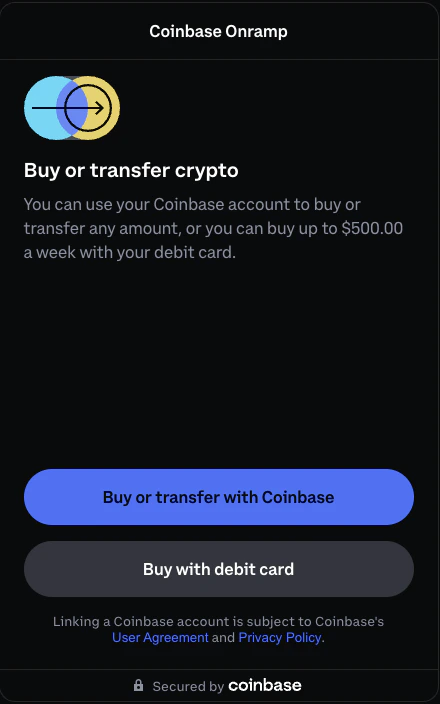 Learn more about Onramp integration options in the [Onramp overview](/onramp/onramp-overview).
## Try Offramp
Generate a session token and create an offramp URL to enable users to cash out crypto to fiat.
### 1. Create a session token
Generate a session token with the user's wallet address.
For example:
```bash theme={null}
cdpcurl -X POST 'https://api.developer.coinbase.com/onramp/v1/token' \
-k ~/Downloads/cdp_api_key.json \
-d '{
"addresses": [{
"address": "0x1234567890abcdef1234567890abcdef12345678",
"blockchains": ["base", "ethereum"]
}],
"clientIp": "192.0.2.1"
}'
```
The response includes a `token` you'll use to create the offramp URL. For example:
```
200 OK
{"token":"N2ZyMjIyOTktYjE4NC03ZGc5LWM5YmItOWIwZzYxYzNlMjMx","channel_id":""}
```
The same token endpoint (`/onramp/v1/token`) is used for both Onramp and Offramp. However, each token is single-use and expires after 5 minutes, so you need to create a new token for each user session.
### 2. Direct users to the offramp
Construct an offramp URL with the required parameters:
```
https://pay.coinbase.com/v3/sell/input?sessionToken=YOUR_TOKEN&partnerUserRef=test-user&redirectUrl=http://localhost:3000
```
Replace:
* `YOUR_TOKEN` with the token from the previous step
* `test-user` with any unique string to identify this user
* `http://localhost:3000` with your redirect URL
**Offramp requires both `partnerUserRef` and `redirectUrl` parameters.** Production redirect URLs must be added to your domain allowlist. See [Security Requirements](/onramp/security-requirements).
Direct users to this URL to complete the cash out process.
Learn more about Onramp integration options in the [Onramp overview](/onramp/onramp-overview).
## Try Offramp
Generate a session token and create an offramp URL to enable users to cash out crypto to fiat.
### 1. Create a session token
Generate a session token with the user's wallet address.
For example:
```bash theme={null}
cdpcurl -X POST 'https://api.developer.coinbase.com/onramp/v1/token' \
-k ~/Downloads/cdp_api_key.json \
-d '{
"addresses": [{
"address": "0x1234567890abcdef1234567890abcdef12345678",
"blockchains": ["base", "ethereum"]
}],
"clientIp": "192.0.2.1"
}'
```
The response includes a `token` you'll use to create the offramp URL. For example:
```
200 OK
{"token":"N2ZyMjIyOTktYjE4NC03ZGc5LWM5YmItOWIwZzYxYzNlMjMx","channel_id":""}
```
The same token endpoint (`/onramp/v1/token`) is used for both Onramp and Offramp. However, each token is single-use and expires after 5 minutes, so you need to create a new token for each user session.
### 2. Direct users to the offramp
Construct an offramp URL with the required parameters:
```
https://pay.coinbase.com/v3/sell/input?sessionToken=YOUR_TOKEN&partnerUserRef=test-user&redirectUrl=http://localhost:3000
```
Replace:
* `YOUR_TOKEN` with the token from the previous step
* `test-user` with any unique string to identify this user
* `http://localhost:3000` with your redirect URL
**Offramp requires both `partnerUserRef` and `redirectUrl` parameters.** Production redirect URLs must be added to your domain allowlist. See [Security Requirements](/onramp/security-requirements).
Direct users to this URL to complete the cash out process.
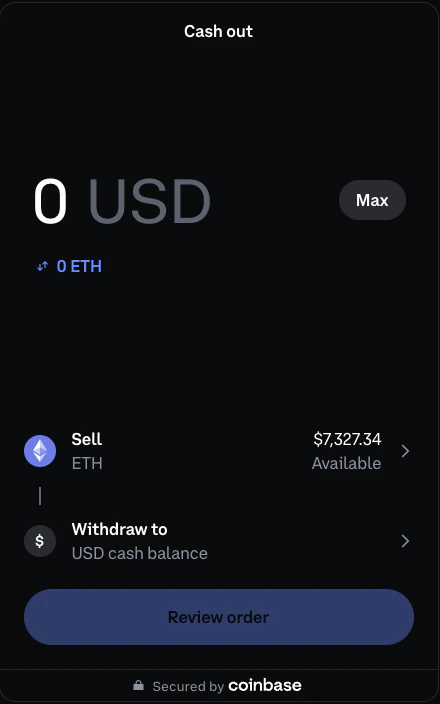 Learn more about Offramp integration in the [Offramp overview](/onramp/offramp/offramp-overview).
## What to build next
Receive real-time transaction notifications.
Test your integration without real funds.
Implement CORS and authentication requirements.
Need help? Join our [Discord community](https://discord.com/invite/cdp) to connect with our team and other developers.
Learn more about Offramp integration in the [Offramp overview](/onramp/offramp/offramp-overview).
## What to build next
Receive real-time transaction notifications.
Test your integration without real funds.
Implement CORS and authentication requirements.
Need help? Join our [Discord community](https://discord.com/invite/cdp) to connect with our team and other developers.