> ## Documentation Index
> Fetch the complete documentation index at: https://docs.cloud.coinbase.com/llms.txt
> Use this file to discover all available pages before exploring further.
# 2. Stake to with Ledger Live
### 1. Delegate your ATOM
1. Select Accounts within Ledger Live and open your Cosmos account.
2. Under *Delegation(s)* on the Cosmos account dashboard select *Earn Rewards*.
3. On the pop-up screen, select *Continue*.
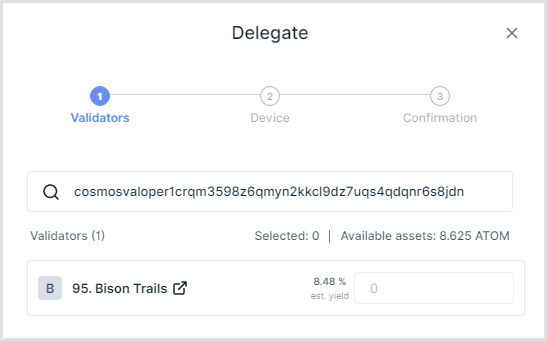
4. On the Validators screen, click in the search box to *Search by name or address...*
 **COINBASE VALIDATOR INFORMATION**
Validator name: Coinbase02
Validator address : `cosmosvaloper1gqem6t55xrjc8nqf7y8jyp9xzgnm60zu007nrl`
5. Enter Coinbase's validator address: `cosmosvaloper1gqem6t55xrjc8nqf7y8jyp9xzgnm60zu007nrl`.
6. To the right of the estimated yield for the Coinbase validator, enter the amount of ATOM you would like to delegate and click *Continue*.
7. Confirm that the validator address is correct on the screen of your Ledger hardware device, and, if so, select to confirm.
A verification page will show that your delegation is complete.
**Congratulations! You are now staked to a Coinbase validator.**
**COINBASE VALIDATOR INFORMATION**
Validator name: Coinbase02
Validator address : `cosmosvaloper1gqem6t55xrjc8nqf7y8jyp9xzgnm60zu007nrl`
5. Enter Coinbase's validator address: `cosmosvaloper1gqem6t55xrjc8nqf7y8jyp9xzgnm60zu007nrl`.
6. To the right of the estimated yield for the Coinbase validator, enter the amount of ATOM you would like to delegate and click *Continue*.
7. Confirm that the validator address is correct on the screen of your Ledger hardware device, and, if so, select to confirm.
A verification page will show that your delegation is complete.
**Congratulations! You are now staked to a Coinbase validator.**