> ## Documentation Index
> Fetch the complete documentation index at: https://docs.cloud.coinbase.com/llms.txt
> Use this file to discover all available pages before exploring further.
# 2. Stake DOT to Coinbase with Ledger Live
Nomination Pools are not currently supported on Ledger Live. You can use this guide to nominate directly to Coinbase validators or follow our guide to joining a pool through the Polkadot UI.
## 1. Bond your DOT
1. Select **Accounts** within [Ledger Live](https://www.ledger.com/ledger-live) and open your Polkadot account.
2. Select **Earn Rewards** under **Nominations** on the Polkadot account dashboard.
3. Select **Continue**.
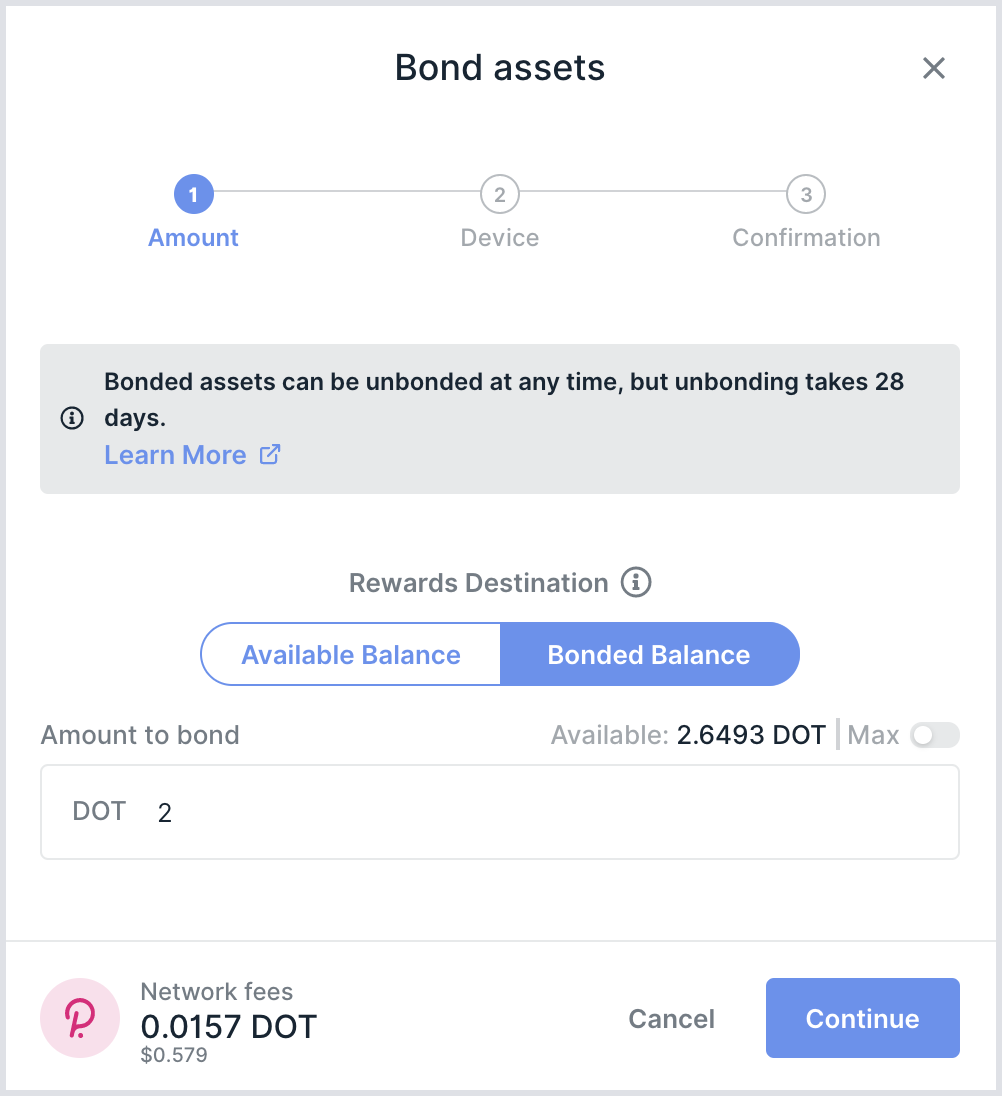 4. Select your **Rewards Destination**:
* Select **Bonded Balance** to compound your rewards on your Stash account (most common), or
* Select **Available Balance** to leave your rewards un-bonded and spendable in your Polkadot account.
5. Under **Amount to bond** enter the amount you would like to stake with Coinbase.
Leave enough DOT unbonded in your account to pay for future transaction fees, such as sending and withdrawing your staked DOT.
6. Select **Continue** and follow the on-screen prompts to confirm the transaction on your Ledger device.
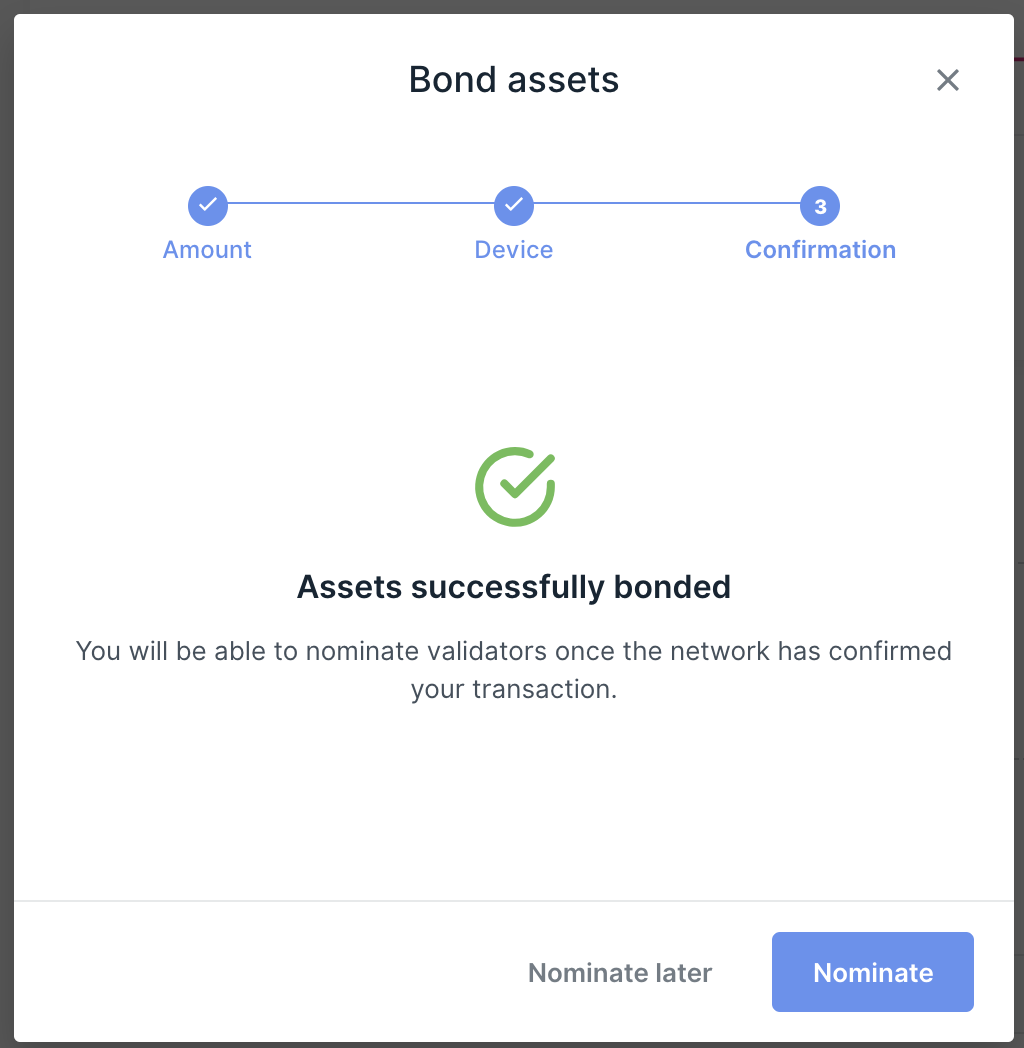
7. Wait for the transaction to complete for your DOT to be bonded and ready for delegation.
4. Select your **Rewards Destination**:
* Select **Bonded Balance** to compound your rewards on your Stash account (most common), or
* Select **Available Balance** to leave your rewards un-bonded and spendable in your Polkadot account.
5. Under **Amount to bond** enter the amount you would like to stake with Coinbase.
Leave enough DOT unbonded in your account to pay for future transaction fees, such as sending and withdrawing your staked DOT.
6. Select **Continue** and follow the on-screen prompts to confirm the transaction on your Ledger device.
7. Wait for the transaction to complete for your DOT to be bonded and ready for delegation.
 ## 2. Stake your DOT with Coinbase
1. Once your transaction has completed to bond your DOT, select **Nominate**.
2. In the search field, search for **Coinbase**.
**COINBASE VALIDATOR INFORMATION**
**Nomination Pool name:** Coinbase
**Nomination Pool address:** 13UVJyLnDyp2ScAFQeiGKD7WwtECPFeNowcHTGeAknuAMY
**Nomination Pool ID:** 58
**Validator name:** Coinbase
**Validator addresses:**
**01:** 1vr6DTXznesaFBuwPejAr1ubZmkLrfGXgpMVyCSumjVikdTm
**02:** 16hgbL2UzeZRue3QnvS8rT5JNdioKrbchYYmsy6Y8MfAwcY
**03:** 127cHPrF6GMAGDEUB5cyFZS9TFeQfDVnkuxTehC3LrqoZ9z
**04:** 1ze1tkDgTF9GYziTSeqivunXFrvhpkS3RQ2Yodin3AMAoqTn
**05:** 12JiixP8cybgifPkuEMr4bGLqtbz9aeaH8BecJ9Z4YgHPJn
**06:** 1Aq7eRrXETZGuACL1zrB1EzXXqzXZEBMFAuhTqQSr5rceMSLXo
**07:** 1sZATyIFEu8yQ0ZzgpPLaRckM7qXLm5CKqDYeTvGnvGvcRo
**08:** 15PpxQ3nmitdcZDRrpAXT4BVDLK1EzH4NjtfaSevGj97RFGoYS
**09:** 12XTFM1yXhG5pcc1SRUSLXEKYsznocqMhfmKtGjSXT3cM
**10:** 1ZECGGDLEmAiy4HoLn3QTMGZNJTDfQpSdnLuvJHgEr8ogGrMZ
**11:** 1nHVW9z87UFRJsxXPHeRp7AChoBhj QagSqxrbgkkbtonLYMJ
**12:** 1ZmWNGAaxb64V7ZyQKMXwfVuPSGR2YXTqHqzDKsi1tZbZFM4
**13:** 13RNHWLoy6xeDNnGeMRubGoken9G2dydoLt4nPSEKhQP
**14:** 1Jn9RK8GVrtqj3qkAhXJVhq8vBSzGnqNYHJDts9ueuJ65ZBzq
**15:** 1446LNKPxFTHqfreMn4kGen4pAKCLgMejvSQ7szMhexLoMK
**16:** 14nFBALTSqNUGebHkt7QRhZv6drGuRJVqGuevDR6dTKZqhrL
Enter each of the Coinbase validator addresses from the list above when staking.
Selecting any or all validators from this list indicates your willingness to support those selected. The protocol automatically allocates your stake to a subset of the validators from your nominated list to participate and earn rewards each era. Selecting any or all validators increases your opportunities to earn rewards. See the [**Polkadot FAQ**](/staking/staking-delegation-guides/polkadot/polkadot-faq) to learn more.
3. Select **Continue**.
4. Confirm that the validator addresses are correct on your Ledger hardware device's screen.
5. Select **Accept** to confirm.
A verification page shows that your delegation is complete.
**Congratulations! You are now staking with Coinbase.**
## 2. Stake your DOT with Coinbase
1. Once your transaction has completed to bond your DOT, select **Nominate**.
2. In the search field, search for **Coinbase**.
**COINBASE VALIDATOR INFORMATION**
**Nomination Pool name:** Coinbase
**Nomination Pool address:** 13UVJyLnDyp2ScAFQeiGKD7WwtECPFeNowcHTGeAknuAMY
**Nomination Pool ID:** 58
**Validator name:** Coinbase
**Validator addresses:**
**01:** 1vr6DTXznesaFBuwPejAr1ubZmkLrfGXgpMVyCSumjVikdTm
**02:** 16hgbL2UzeZRue3QnvS8rT5JNdioKrbchYYmsy6Y8MfAwcY
**03:** 127cHPrF6GMAGDEUB5cyFZS9TFeQfDVnkuxTehC3LrqoZ9z
**04:** 1ze1tkDgTF9GYziTSeqivunXFrvhpkS3RQ2Yodin3AMAoqTn
**05:** 12JiixP8cybgifPkuEMr4bGLqtbz9aeaH8BecJ9Z4YgHPJn
**06:** 1Aq7eRrXETZGuACL1zrB1EzXXqzXZEBMFAuhTqQSr5rceMSLXo
**07:** 1sZATyIFEu8yQ0ZzgpPLaRckM7qXLm5CKqDYeTvGnvGvcRo
**08:** 15PpxQ3nmitdcZDRrpAXT4BVDLK1EzH4NjtfaSevGj97RFGoYS
**09:** 12XTFM1yXhG5pcc1SRUSLXEKYsznocqMhfmKtGjSXT3cM
**10:** 1ZECGGDLEmAiy4HoLn3QTMGZNJTDfQpSdnLuvJHgEr8ogGrMZ
**11:** 1nHVW9z87UFRJsxXPHeRp7AChoBhj QagSqxrbgkkbtonLYMJ
**12:** 1ZmWNGAaxb64V7ZyQKMXwfVuPSGR2YXTqHqzDKsi1tZbZFM4
**13:** 13RNHWLoy6xeDNnGeMRubGoken9G2dydoLt4nPSEKhQP
**14:** 1Jn9RK8GVrtqj3qkAhXJVhq8vBSzGnqNYHJDts9ueuJ65ZBzq
**15:** 1446LNKPxFTHqfreMn4kGen4pAKCLgMejvSQ7szMhexLoMK
**16:** 14nFBALTSqNUGebHkt7QRhZv6drGuRJVqGuevDR6dTKZqhrL
Enter each of the Coinbase validator addresses from the list above when staking.
Selecting any or all validators from this list indicates your willingness to support those selected. The protocol automatically allocates your stake to a subset of the validators from your nominated list to participate and earn rewards each era. Selecting any or all validators increases your opportunities to earn rewards. See the [**Polkadot FAQ**](/staking/staking-delegation-guides/polkadot/polkadot-faq) to learn more.
3. Select **Continue**.
4. Confirm that the validator addresses are correct on your Ledger hardware device's screen.
5. Select **Accept** to confirm.
A verification page shows that your delegation is complete.
**Congratulations! You are now staking with Coinbase.**