> ## Documentation Index
> Fetch the complete documentation index at: https://docs.cloud.coinbase.com/llms.txt
> Use this file to discover all available pages before exploring further.
# Custodial Wallets Quickstart
> Create a custodial account in Sandbox and verify balances with the CDP CLI
This guide walks you through creating an **entity-owned** custodial account in **Sandbox**, adding test balances in the CDP Portal, and checking balances with the **[CDP CLI](/get-started/build-with-ai/cdp-for-agents)**.
For Sandbox API keys and environment basics, see the [Sandbox quickstart](/get-started/sandbox/quickstart).
**Base API URL (Sandbox):** `https://sandbox.cdp.coinbase.com`
## Prerequisites
* A CDP login with access to the [CDP Portal](https://portal.cdp.coinbase.com)
* [Node.js](https://nodejs.org/) 22 or later
* A **Sandbox** API key JSON from the Portal (**Sandbox** environment, **Accounts** permission enabled)
Never commit API keys to source control. Store them in environment variables or a secrets manager. Do not use real personal data in the Sandbox environment.
## 1. Install CDP CLI
[CDP CLI](/get-started/build-with-ai/cdp-for-agents) handles JWT authentication for you — configure your API key once and it signs requests.
```bash theme={null}
npm install -g @coinbase/cdp-cli
cdp --version
```
Node.js 22 or later is required.
**Configure your Sandbox API key:**
```bash theme={null}
cdp env sandbox --key-file ~/Downloads/cdp_api_key.json
```
Use `-e sandbox` on commands below if your default environment is not `sandbox`, or run `cdp env sandbox` to switch context. More detail: [CDP CLI quickstart](/get-started/build-with-ai/cdp-for-agents).
## 2. Create an account (API)
Create a named entity account with `POST /v2/accounts`. Optionally add an idempotency header so retries return the same result; see [Idempotency](/api-reference/v2/idempotency).
```bash theme={null}
cdp api -X POST /accounts name="My Test Account" -e sandbox
```
With an idempotency key:
```bash theme={null}
cdp api -X POST /accounts name="My Test Account" "Header:X-Idempotency-Key:$(uuidgen)" -e sandbox
```
```json theme={null}
{
"accountId": "account_af2937b0-9846-4fe7-bfe9-ccc22d935114",
"type": "cdp",
"owner": "entity_af2937b0-9846-4fe7-bfe9-ccc22d935114",
"name": "My Test Account",
"createdAt": "2023-10-08T14:30:00Z",
"updatedAt": "2023-10-08T14:30:00Z"
}
```
Copy the `accountId` from the response (for example `account_af2937b0-9846-4fe7-bfe9-ccc22d935114`). You use it in the Portal and in the verify step below.
`cdp api` paths are relative to the Sandbox platform base `https://sandbox.cdp.coinbase.com/platform/v2`. If `cdp api` fails with a host or path error, configure the URL explicitly: `cdp env sandbox --key-file ~/Downloads/cdp_api_key.json --url https://sandbox.cdp.coinbase.com/platform/v2`. See [How it works](/get-started/build-with-ai/cdp-for-agents#how-it-works).
## 3. Create and fund the account through the Portal
Sandbox does not move real funds. You add **simulated** balances in the Portal:
In **Sandbox** mode in the CDP Portal, open the **Accounts** tab.
Open the account you created with the API (for example **My Test Account**).
Add balances in supported test assets (for example **USD** and **USDC**). Values are for testing only.
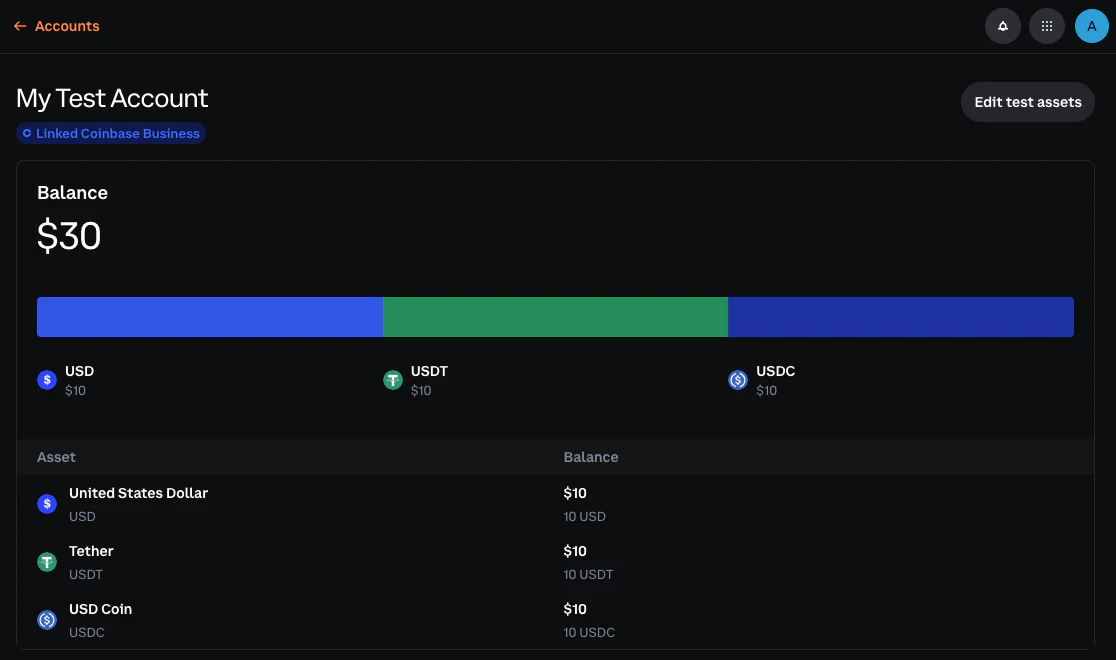 All balances are simulated in Sandbox — no blockchain or testnet connectivity. You cannot fund accounts by sending real or testnet crypto.
## 4. Verify balance(s)
```bash theme={null}
export ACCOUNT_ID="account_af2937b0-9846-4fe7-bfe9-ccc22d935114"
cdp accounts balance "$ACCOUNT_ID"
```
List all custodial account IDs:
```bash theme={null}
cdp accounts list
```
`cdp accounts list` and `cdp accounts balance` ship in recent `@coinbase/cdp-cli` releases. If your CLI reports an unknown command, run `npm install -g @coinbase/cdp-cli@latest`, then try again. You can always use `cdp api "/accounts/$ACCOUNT_ID/balances" -e sandbox` as a fallback; see [List balances for account](/api-reference/v2/rest-api/accounts/list-balances-for-account).
## What to read next
Concepts: custody model, ownership, and how accounts connect to payments
Environments and `cdp api` field syntax
Generate inbound addresses tied to an account
REST reference for account and balance endpoints
All balances are simulated in Sandbox — no blockchain or testnet connectivity. You cannot fund accounts by sending real or testnet crypto.
## 4. Verify balance(s)
```bash theme={null}
export ACCOUNT_ID="account_af2937b0-9846-4fe7-bfe9-ccc22d935114"
cdp accounts balance "$ACCOUNT_ID"
```
List all custodial account IDs:
```bash theme={null}
cdp accounts list
```
`cdp accounts list` and `cdp accounts balance` ship in recent `@coinbase/cdp-cli` releases. If your CLI reports an unknown command, run `npm install -g @coinbase/cdp-cli@latest`, then try again. You can always use `cdp api "/accounts/$ACCOUNT_ID/balances" -e sandbox` as a fallback; see [List balances for account](/api-reference/v2/rest-api/accounts/list-balances-for-account).
## What to read next
Concepts: custody model, ownership, and how accounts connect to payments
Environments and `cdp api` field syntax
Generate inbound addresses tied to an account
REST reference for account and balance endpoints