> ## Documentation Index
> Fetch the complete documentation index at: https://docs.cloud.coinbase.com/llms.txt
> Use this file to discover all available pages before exploring further.
# Domain Allowlisting
export const Tags = ({tags, className}) => {
if (!tags || !Array.isArray(tags)) {
return null;
}
return
{tags.map((tag, index) => {tag})}
;
};
## Overview
The Coinbase Developer Platform (CDP) [Portal](https://portal.cdp.coinbase.com) requires you configure which domains are authorized to access CDP APIs. These domains are configured using Cross-Origin Resource Sharing (CORS), ensuring your users are protected while maintaining a seamless experience.
CORS (Cross-Origin Resource Sharing) is a browser security mechanism that controls access between different web origins. An origin is defined by the combination of protocol (http/https), domain, and port.
By default, browsers enforce the **same-origin policy**, blocking requests between different origins for security. CORS provides a way to safely relax this restriction:
* **Without CORS**: Your website at `https://myapp.com` cannot access APIs at `https://api.cdp.coinbase.com`
* **With CORS**: The API server explicitly allows specific origins, enabling secure cross-origin communication
Learn more about CORS fundamentals in the [MDN documentation](https://developer.mozilla.org/en-US/docs/Web/HTTP/CORS).
By properly configuring your user wallet domains, you create a secure boundary that ensures only authorized applications can access our APIs, preventing malicious websites from exploiting your wallet integration, and protecting your users from cross-site scripting attacks.
## Example
Let's walk through a practical example:
1. A dapp at `https://app.developer.com` wants to send a POST request to `https://api.cdp.coinbase.com/embedded-wallet-api/projects/{projectId}` (e.g., to create a wallet).
2. When Coinbase Developer Platform (CDP) receives the request, it will look up the list of allowed domains for the given project ID.
3. CDP queries its database and sees that the developer has configured `https://app.developer.com` as an allowed domain for the project.
4. CDP responds to the API with the following header set, allowing the response to return successfully:
```
Access-Control-Allow-Origin: https://app.developer.com
```
## How to configure domains
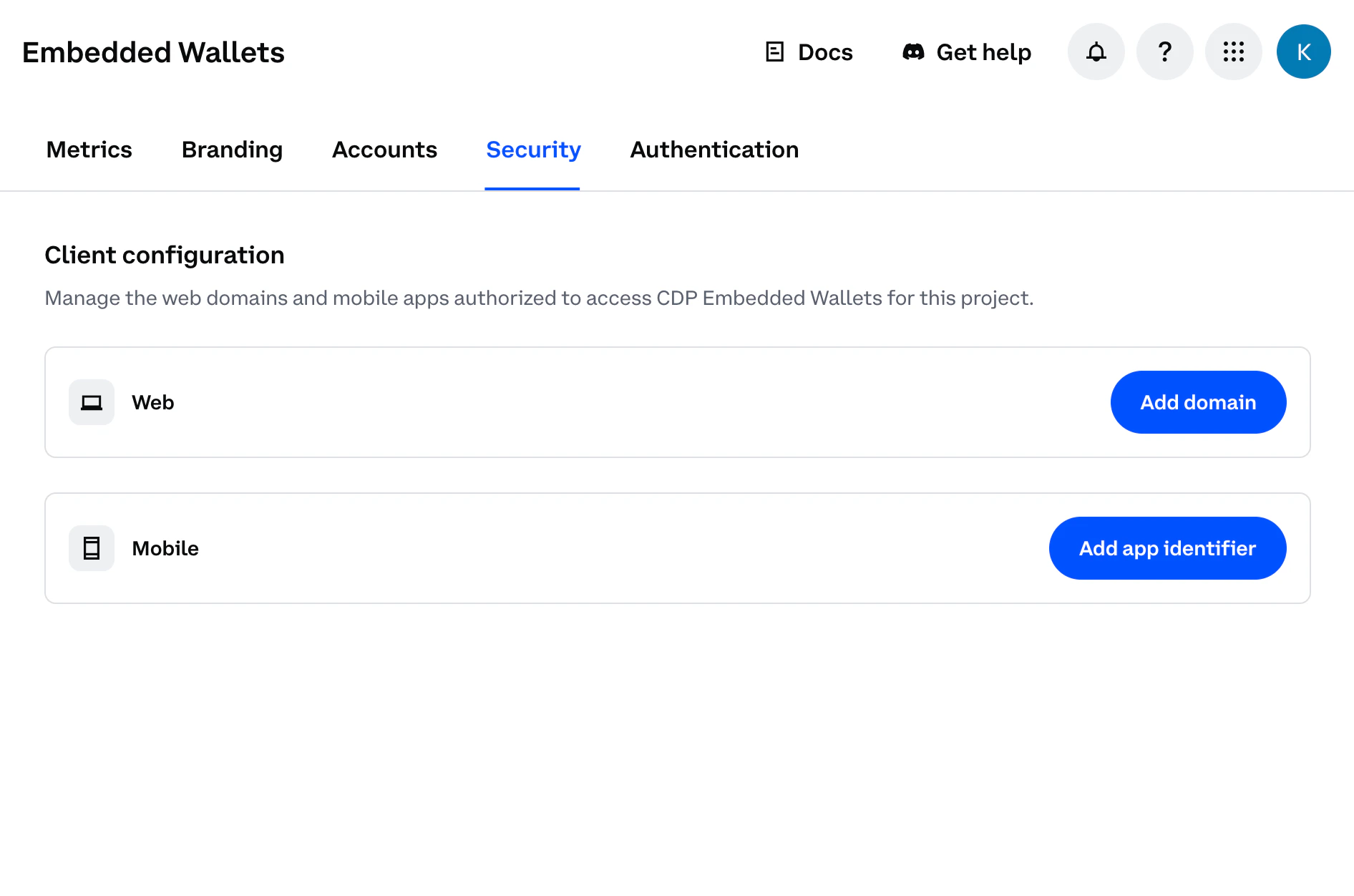
Navigate to the [Domains Configuration](https://portal.cdp.coinbase.com/products/embedded-wallets/security) in CDP Portal:
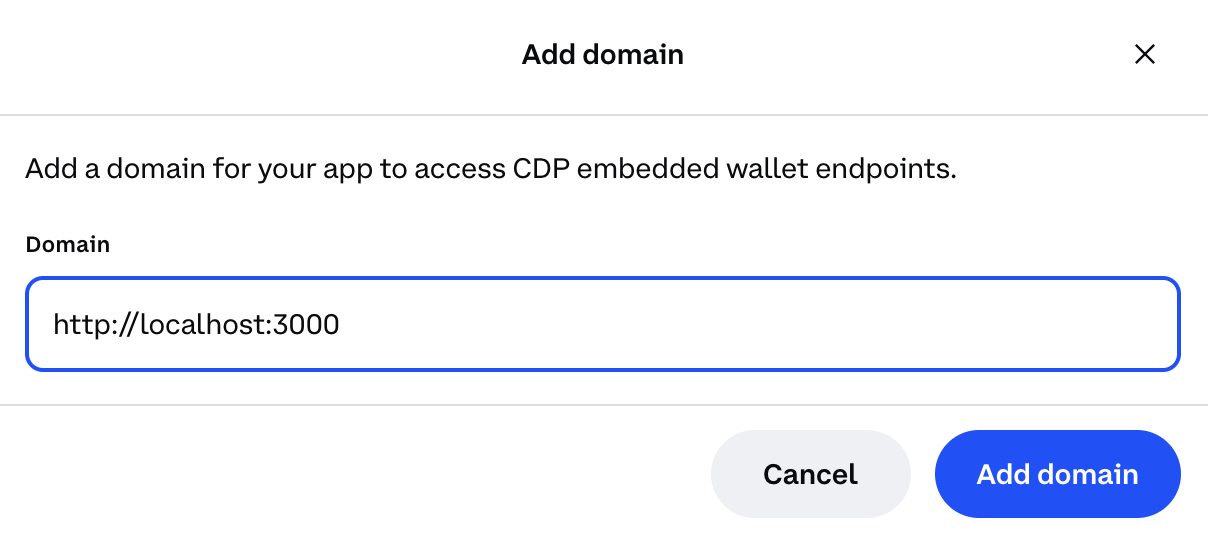
 Click **Add domain** and enter your allowed domain and/or port (e.g., `https://yourdapp.com` in production or `http://localhost:3000` for local development):
 Do not use `localhost` for production use. Malicious apps running locally could impersonate your frontend and abuse your project credentials.
* Domains must be of the form `://:` or browser extension URLs
* `` must be either `http` or `https`
* `` must be a valid hostname
* `:` is optional for ports 80 (http) and 443 (https), but required for all other ports (e.g., `http://localhost:3000`)
* Browser extension URLs are also supported:
* `chrome-extension://` for Chrome extensions
* `moz-extension://` for Firefox extensions
* `safari-web-extension://` for Safari extensions
* When using browser extension schemes, no port or path is allowed - only the unique extension ID following the scheme
* **Mobile app Deep Link URLs** are supported and required for React Native OAuth/social login flows:
* Format: `://`
* `` must match the scheme defined in your React Native app configuration (e.g., `app.json` or `app.config.js`)
* `` can be any path you choose (e.g., `my-app://callback`, `mycompany://oauth`, `myapp://auth/redirect`)
* Maximum of 50 domains allowed per project
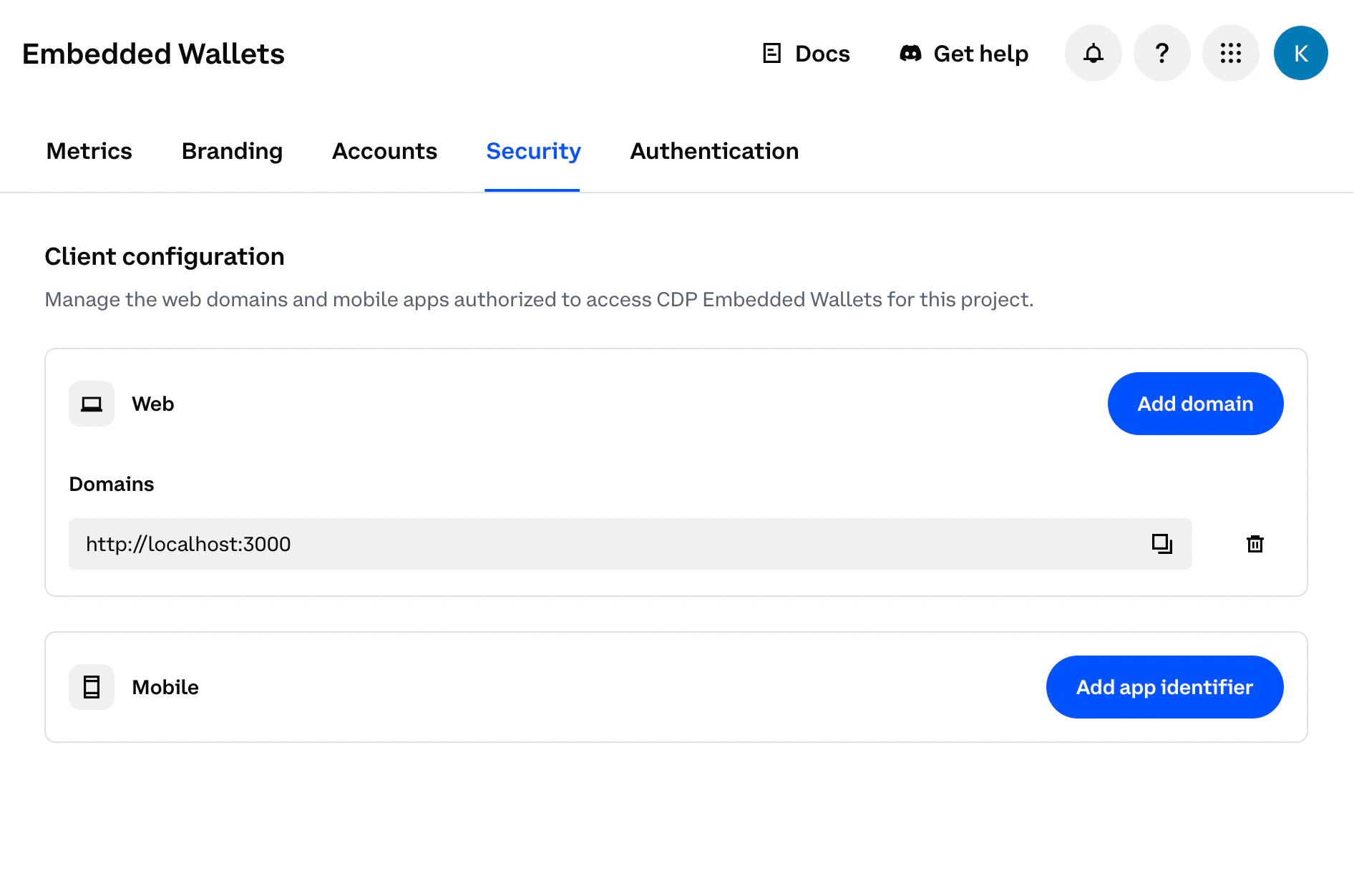
Click **Add domain** to save. Your allowed domains will appear in the dashboard, and changes will take effect immediately:
Do not use `localhost` for production use. Malicious apps running locally could impersonate your frontend and abuse your project credentials.
* Domains must be of the form `://:` or browser extension URLs
* `` must be either `http` or `https`
* `` must be a valid hostname
* `:` is optional for ports 80 (http) and 443 (https), but required for all other ports (e.g., `http://localhost:3000`)
* Browser extension URLs are also supported:
* `chrome-extension://` for Chrome extensions
* `moz-extension://` for Firefox extensions
* `safari-web-extension://` for Safari extensions
* When using browser extension schemes, no port or path is allowed - only the unique extension ID following the scheme
* **Mobile app Deep Link URLs** are supported and required for React Native OAuth/social login flows:
* Format: `://`
* `` must match the scheme defined in your React Native app configuration (e.g., `app.json` or `app.config.js`)
* `` can be any path you choose (e.g., `my-app://callback`, `mycompany://oauth`, `myapp://auth/redirect`)
* Maximum of 50 domains allowed per project
Click **Add domain** to save. Your allowed domains will appear in the dashboard, and changes will take effect immediately:
 Add all domains where your app will run: development, staging, and production.
## What to read next
* **[Quickstart Guide](/wallets/quickstart/user-auth)**: Build your first user wallet app in under 10 minutes
* **[React Hooks Reference](/sdks/cdp-sdks-v2/frontend/@coinbase/cdp-hooks)**: Learn about available hooks like `useSignInWithEmail`, `useEvmAddress`, `useSendSolanaTransaction`, and more
* **[React Components Guide](/wallets/client-side-development/react-components)**: Explore pre-built components for authentication, wallet management, and transactions
Add all domains where your app will run: development, staging, and production.
## What to read next
* **[Quickstart Guide](/wallets/quickstart/user-auth)**: Build your first user wallet app in under 10 minutes
* **[React Hooks Reference](/sdks/cdp-sdks-v2/frontend/@coinbase/cdp-hooks)**: Learn about available hooks like `useSignInWithEmail`, `useEvmAddress`, `useSendSolanaTransaction`, and more
* **[React Components Guide](/wallets/client-side-development/react-components)**: Explore pre-built components for authentication, wallet management, and transactions