Scopes allow you to specify fine-grained access for your OAuth2 applications. Getting your scopes right is key to developing safe and trustworthy applications.
With OAuth2, scopes are set in the authorization URL and determine what API endpoints your application can access. All authenticated endpoints, except GET /user, require a specific scope.With OAuth2, scopes should be considered as grants—users can select which scopes they allow for your application. To see which scopes a user has granted, use the GET /user/auth endpoint.
Plan your scopes carefully before launch. Scopes are declared when you register your OAuth application and are difficult to change later. Adding new scopes after users have already authorized your app requires them to re-authorize, which can disrupt their user experience.
Only request scopes your application needs. Users more readily grant access to limited, clearly described scopes.
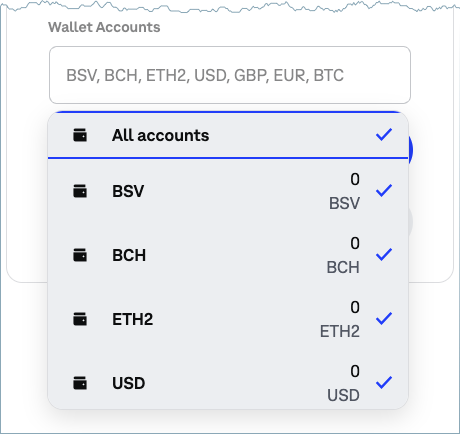
In addition to scopes, Coinbase App applications can request different levels of access to user’s wallets. This access is defined by a dropdown selection on the consent page when the user connects to your app.Account access works together with scopes. For example, account=all combined with scope=wallet:buys:create allows your app to create buys on all of the user’s wallets, but won’t give access to sell on any of their accounts.
Below are listed all the available scopes for both Coinbase App application and API keys. For more information to understand which permission is required for a specific API action/endpoint, follow our API reference which includes Permissions section under each endpoint.
Scope
Description
wallet:accounts:read
List user’s accounts and their balances
wallet:accounts:update
Update account (e.g. change name)
wallet:accounts:create
Create a new account (e.g. BTC wallet)
wallet:accounts:delete
Delete existing account
wallet:addresses:read
List account’s bitcoin or ethereum addresses
wallet:addresses:create
Create new bitcoin or ethereum addresses for wallets
wallet:buys:read
List account’s buys
wallet:buys:create
Buy bitcoin or ethereum
wallet:deposits:read
List account’s deposits
wallet:deposits:create
Create a new deposit
wallet:notifications:read
List user’s notifications
wallet:payment-methods:read
List user’s payment methods (e.g. bank accounts)
wallet:payment-methods:delete
Remove existing payment methods
wallet:payment-methods:limits
Get detailed limits for payment methods (useful for performing buys and sells). This permission is to be used together with wallet:payment-methods:read
wallet:sells:read
List account’s sells
wallet:sells:create
Sell bitcoin or ethereum
wallet:trades:read
List trades
wallet:trades:create
Create trades
wallet:transactions:read
List account’s transactions
wallet:transactions:send
Send bitcoin or ethereum
wallet:transactions:request
Request bitcoin or ethereum from a Coinbase user
wallet:transactions:transfer
Transfer funds between user’s two bitcoin or ethereum accounts
wallet:user:read
List detailed user information (public information is available without this permission)
wallet:user:update
Update current user
wallet:user:email
Read current user’s email address
wallet:withdrawals:read
List account’s withdrawals
wallet:withdrawals:create
Create a new withdrawal
offline_access
Return a refresh token in response
Was this page helpful?
Assistant
Responses are generated using AI and may contain mistakes.