

Prerequisites
- A free CDP account
1. Try it in the playground
2. Get your RPC endpoint
To use Node in your application, you need an RPC endpoint URL. This is the web address where you send blockchain requests—think of it like an API endpoint, but specifically for blockchain operations.1
Navigate to Node
Go to the Node page in CDP Portal.
2
Select your network
Choose your target network from the dropdown: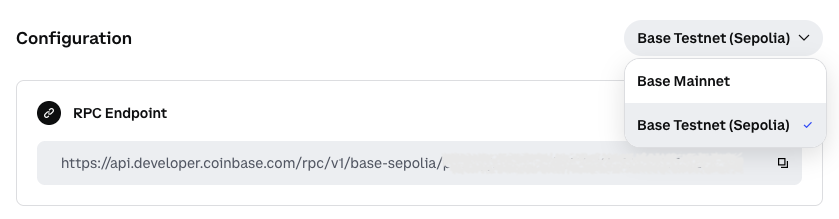
- Base Mainnet - For production applications
- Base Sepolia - For development and testing
3
Copy your endpoint URL
Copy the displayed RPC endpoint URL. It will look like:The Client API key is automatically included in the URL for authentication.
About Client API KeysYour RPC endpoint URL includes a Client API key, which is designed for client-side use and is safe to include in frontend code. For more details, see Client API Key.
3. Make your first request
Now let’s make your first blockchain request programmatically. We’ll query the current block number on Base.- cURL
- JavaScript (fetch)
- Python
- Node.js
What to read next
- Core EVM Methods: Explore all available JSON-RPC methods
- Paymaster Methods: Learn how to sponsor gas fees for your users
- Wallet History Methods: Query historical wallet data
- Rate Limits: Understand your usage limits and request increases
- CDP Discord: Join #node for support and to request rate limit increases