

https://sandbox.cdp.coinbase.com
1. Create Sandbox API keys
1
Access CDP Portal Sandbox
Navigate to Sandbox mode in the CDP Portal
2
Create Sandbox API key
- Go to Settings
- Click Create secret API Key
- Enter an API key nickname
- Download the API key JSON file and save it securely
2. Install CDP CLI
CDP CLI is a command-line tool that handles JWT authentication automatically — configure your API key once and it takes care of signing every request for you.Node.js 22 or later is required.
3. Create and fund an account through the portal
1
Go to Sandbox Accounts
In Sandbox mode, navigate to the Accounts tab
2
Create test account
Name the account (e.g., “My Test Account”)
3
Add test assets
Add balances in different assets to your account. Currently we support USD, USDC, USDT (e.g., set USD to $1000)
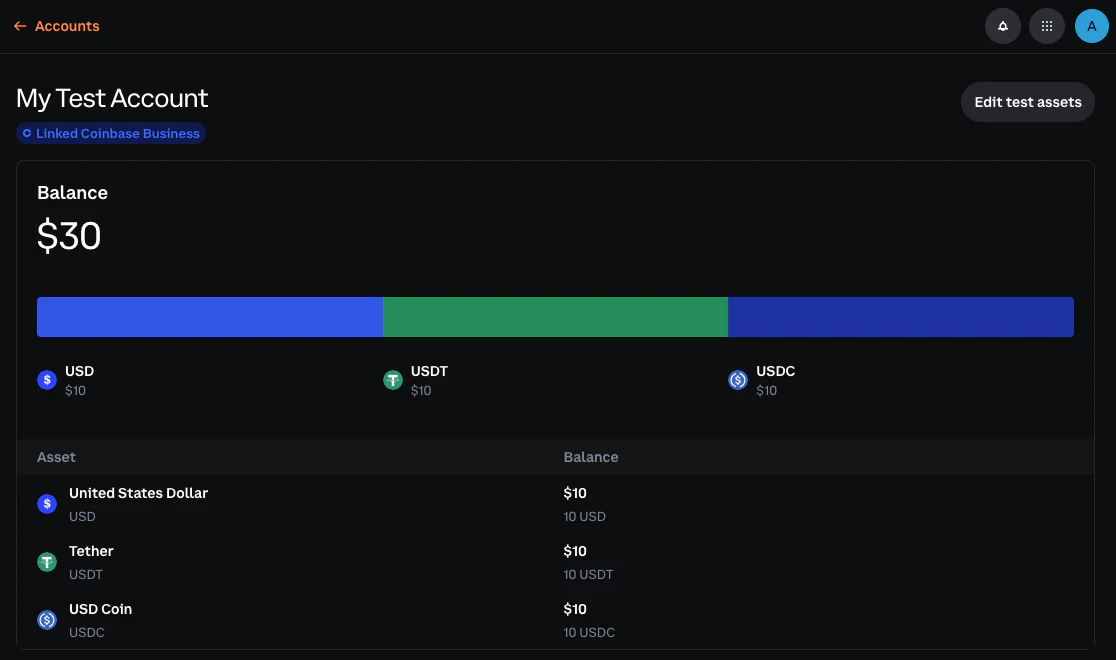
4. Verify balance(s)
Run the following to verify your account balance:5. Alternative: Test with Postman
Prefer a GUI? See the Postman guide for setup instructions.Next steps
Now that you’re set up, explore the resource guides to test specific features:Payment Methods
Test fiat withdrawal flows
Deposit Destinations
Create addresses and simulate incoming deposits
Accounts
Create and manage test accounts
Transfers
Test transfers to crypto addresses and emails
Transitioning to Live
When you’re ready to move from Sandbox to Live:- Complete integration testing: Ensure all features work correctly in Sandbox
- Create Live API keys: Generate Live credentials in the CDP Portal
- Update configuration: Switch from
sandbox.cdp.coinbase.comtoapi.cdp.coinbase.com - Start with small transactions: Begin with small test transactions to verify everything works
- Set up monitoring: Configure alerting for failed transactions and API errors